Camera Settings 102: Selecting Shutter Speed
What is Shutter Speed in Photography
Shutter speed refers to the amount of time your camera’s image sensor is exposed to light. You can think of it as how long your camera keeps its “eyelid” open while taking a photo. This eyelid is actually the shutter, a curtain-like mechanism that opens and closes to let light reach the sensor.
When you press the shutter button on a DSLR, two main things happen:
The shutter curtain opens, exposing the sensor.
The mirror flips up, allowing light to travel through the lens and hit the sensor directly.
In mirrorless cameras, the mirror flip isn’t part of the process—but the concept remains the same: the shutter stays open for a specific amount of time, and that duration determines how much light the camera records.
A fast shutter speed means the shutter opens and closes quickly, letting in less light. A slow shutter speed stays open longer, allowing more light to enter. This simple timing plays a big role in how movement, brightness, and sharpness appear in your final image.
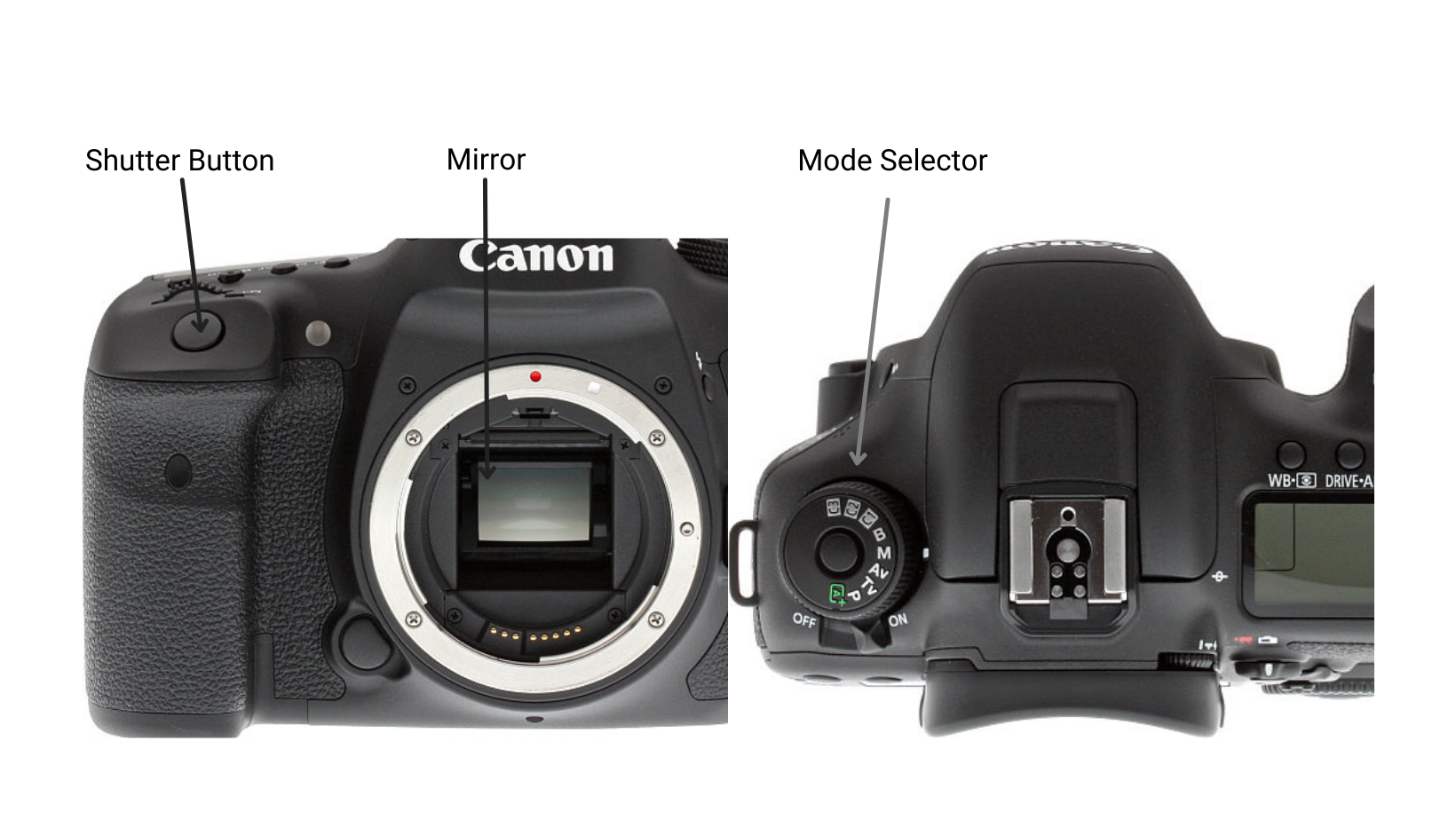
How to Adjust Shutter Speed
Most digital cameras give you several ways to control shutter speed. Your choice depends on how much control you want and what kind of photography you’re doing.
Auto Mode
In Auto Mode, your camera does all the thinking for you. It evaluates the light in the scene and automatically selects a shutter speed that it believes will create a well-exposed image. This mode is convenient for quick snapshots or beginners who want to focus on framing rather than settings.
Shutter Priority Mode (S or Tv)
Shutter Priority gives you creative freedom while still offering some camera assistance. You choose the shutter speed you want, and the camera automatically adjusts the aperture (and often ISO) to match. This is ideal when your primary goal is to freeze motion or capture blur.
Manual Mode (M)
Manual Mode is full creative control. You adjust the shutter speed, aperture, and ISO yourself. In this mode, the camera won’t compensate for lighting changes—you’re in charge of balancing everything. It’s the perfect mode for learning exposure deeply and taking intentional, artistic photos.
How Shutter Speed is Measured
Shutter speed is almost always measured in fractions of a second when the exposure time is under one second. For example:
1/250 means one two-hundred-fiftieth of a second
1/8 means one-eighth of a second
Most DSLR and mirrorless cameras can shoot at speeds as fast as 1/4000 sec or even faster, depending on the model. On the other end, many cameras can shoot at 30 seconds or longer.
For extremely long exposures—like photographing light trails or starry skies—you can use Bulb Mode. This mode allows you to hold down the shutter button (or use a remote switch) for as long as you’d like, keeping the shutter open manually to capture extended motion or low-light scenes.
Quick note: Some cameras simplify the display by only showing the denominator. For example, 1/125 sec might appear simply as 125, and 10 seconds may display as 10”.

Pro-Tip: Using bulb mode allows you to manually press & hold the shutter button (or remote shutter switch) to achieve a longer shutter speed; allowing the image sensor’s exposure time to be prolonged.
Helpful: Some camera manufacturers do not include the numerator in the shutter speed, so 1/125 sec would just be 125 sec and 10 seconds would be 10” sec.
How Does Shutter Speed Affect the Photo
Shutter speed directly impacts how motion appears in your image. It helps you decide whether your photo feels frozen in time or filled with movement.
Fast Shutter Speeds
Fast speeds such as 1/1000 sec or quicker freeze action. They’re great for situations where your subject is moving quickly—like birds in flight, sports scenes, or raindrops hitting the pavement. These speeds stop motion cleanly and create sharp, crisp images.
Mid-Range Shutter Speeds

(above images shot using a tripod)
Speeds between 1/10 sec and 1/1000 sec are your general-purpose settings. They work well for casual portraits, lifestyle photography, city scenes, or landscapes where nothing is moving particularly fast.
Slow Shutter Speeds
Slow speeds—1 second or longer—introduce motion blur on purpose. They create dreamy effects like silky waterfalls, flowing rivers, car light trails, or atmospheric night shots. Because slow shutter speeds capture movement over time, using a tripod is essential to prevent unintended camera shake.
A Helpful Rule for Handheld Shooting
When shooting without a tripod, use this simple guideline:
Your shutter speed should be at least double your focal length.
Example:
If you’re using a 50mm lens:
50 × 2 = 100 → choose 1/100 sec (or the next fastest option) to avoid blur.
So What Shutter Speed Should You Use
There’s no single “correct” shutter speed—it depends on the lighting conditions, your subject, whether you’re using a tripod, and the artistic effect you want. Are you trying to freeze your child jumping in the air? Or are you hoping to capture the smooth motion of a waterfall? Your creative vision determines your shutter speed.
Many photographers prefer shooting in Aperture Priority (A/Av), which allows the camera to choose a shutter speed based on the aperture you select. This is a great way to learn because you can focus on one setting while still observing how shutter speed changes in different environments.
One of the best ways to truly understand shutter speed is to take several photos of the same scene while adjusting only the shutter speed. Compare the results and notice how the motion, brightness, and overall feel change.
Photography is all about exploration—so experiment often, learn from each shot, and don’t forget to use a tripod for slower shutter speeds to keep your images crisp.